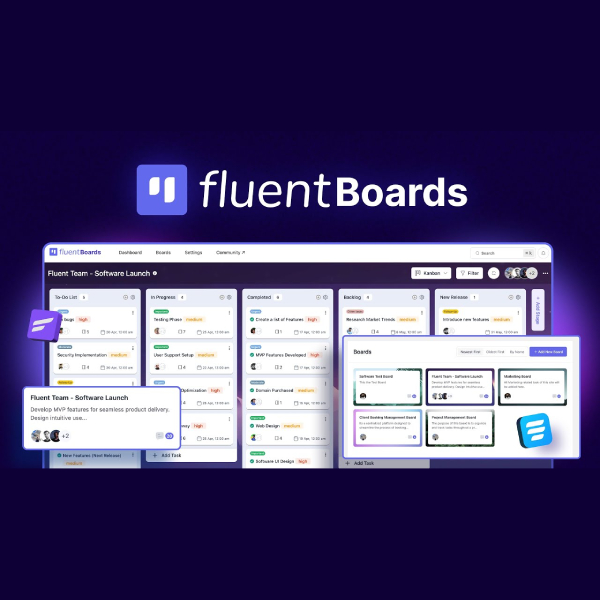
📌 Introduction to FluentBoards
FluentBoards is a powerful project and task management plugin for WordPress, designed to help individuals and teams manage workflows, tasks, and collaboration directly inside their WordPress dashboard — without relying on external SaaS tools.
🧠 1. What is FluentBoards?
- FluentBoards is a WordPress-based project management solution, similar in concept to tools like Trello or Asana, but fully self-hosted.
- It allows you to create boards, manage tasks, assign team members, and track progress from one central place.
- Available in:
- Free (Core) version – suitable for basic task and project management.
- Pro version – adds advanced features like subtasks, file attachments, custom fields, and more.
Example:
Instead of managing projects on Trello and content on WordPress separately, you can manage everything inside WordPress using FluentBoards.
📊 2. What can FluentBoards do?
📍 Project & Workflow Management
- Create multiple boards with customizable stages (e.g. To-Do → In Progress → Review → Done).
- Use an intuitive Kanban drag-and-drop interface.
- Track project status and workload across teams.
Example:
A web agency can create one board per client and separate stages for design, development, testing, and delivery.
📝 Task Creation & Tracking
- Create tasks with:
- Assignees
- Due dates
- Priority levels
- Labels and tags
- Add comments to tasks for contextual discussions.
Example:
A task like “Design Homepage UI” can include a deadline, priority, and internal discussion in one place.
🤝 Team Collaboration
- Assign tasks to specific team members.
- Get notifications on task updates and comments.
- Ideal for remote teams or internal company workflows.
Example:
A content team can collaborate on blog production without switching between chat tools and task managers.
📈 Progress & Performance Monitoring
- Monitor task completion and project progress.
- Identify bottlenecks in workflows.
- Improve productivity with clear task ownership.
Example:
Project managers can quickly see which tasks are overdue and which team members are overloaded.
⚙️ 3. Key Benefits of FluentBoards
- ✅ Native WordPress integration – no external platforms required.
- ✅ Self-hosted & data ownership – full control over your data.
- ✅ Beginner-friendly – easy to use without technical knowledge.
- ✅ Developer-friendly – supports hooks, APIs, and custom integrations.
- ✅ Multiple views available (Kanban, List, Table, Calendar – depending on version).
📌 4. Real-world Use Cases
📢 Marketing Teams
- Create a board named “Marketing Campaign Q1”.
- Set stages: Idea → Content Creation → Launch → Completed.
- Assign tasks to writers, designers, and marketers.
💻 Product & Development Teams
- Use boards for backlog and sprint planning.
- Track bugs, features, and releases visually.
- Communicate directly within tasks.
📌 5. When Should You Use FluentBoards?
- When your business or workflow is already built on WordPress.
- When you want to reduce dependency on third-party SaaS tools.
- When data ownership, privacy, and customization are important to you.
- When managing projects, clients, or internal teams from a single system matters.



Reviews
There are no reviews yet.