Description
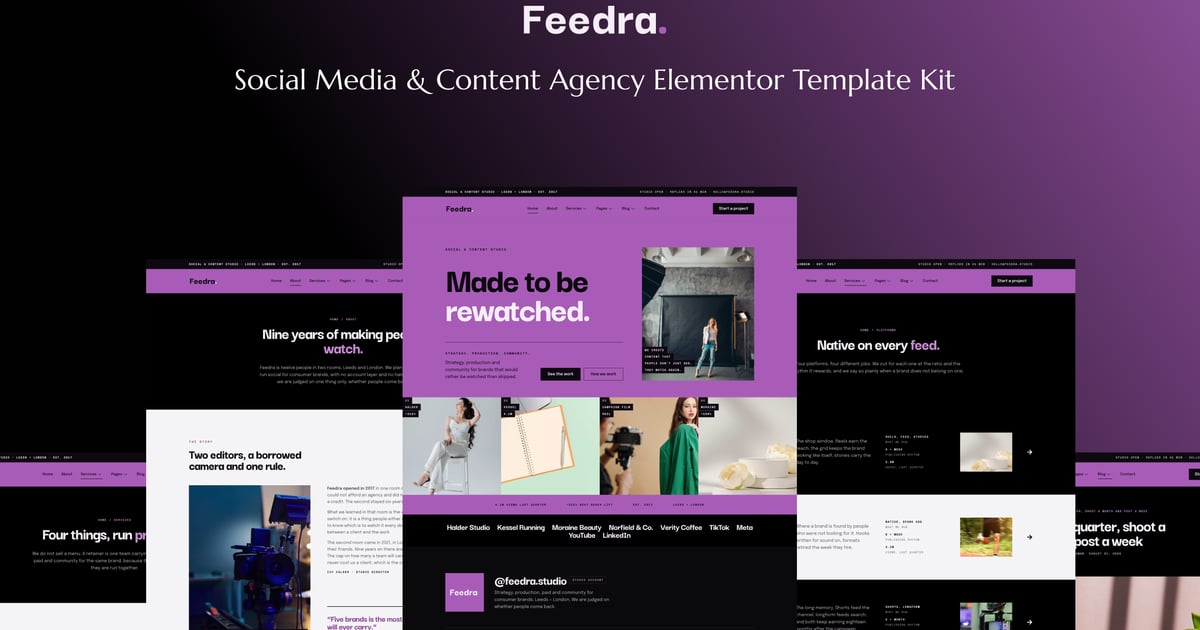
Feedra is an Elementor template kit built for social media and content agencies, content studios, and creator teams whose work should do the selling. The pages are shaped around what a client actually asks for before signing: campaigns written up as case studies with the platform, the result, and the window it happened in, a results page that lists every number with its unit and the quarter it came from, a process page that shows how a quarter runs from brief to report, and platform pages covering what you run on Instagram, TikTok, YouTube, and LinkedIn. There is a retainers page that explains how an engagement is scoped instead of publishing a rate card, a free audit landing page that turns a feed into an enquiry, and a careers page, because agencies hire in public. The look is confident and editorial, a saturated orchid ground under large display type with full bleed work bands, and it holds together on a phone, which is where a prospective client will open your last campaign between meetings.
The whole kit runs on free plugins. ElementsKit Lite builds the header, footer, navigation, and accordions, Gum Addon for Elementor drives the blog grid, related posts, and the dynamic title, featured image, and meta on the article layout, and MetForm handles the project brief, job application, subscribe, and notify forms, with no premium licence to buy. Colours and typography are wired into the Elementor global styles, so putting your own palette and type on it takes one panel and a minute rather than an afternoon of page edits. Import, add your campaign results and two or three case studies, and launch. Ideal for social media agencies, content studios, creator teams, paid social specialists, and community managers that need a site as sharp as the work they post.
Important: This is an Elementor Template Kit. Do not use WordPress “Tools > Import”. Install the Template Kit Import plugin (Plugins > Add New), then go to Tools > Template Kit to import.
Features:
- For Social Media & Content Agencies
- Fully With Elementor Free Version (Elementor Pro is not required)
- Simple, Modern and Clean Design
- No Coding Knowledge Required
- 29+ Ready To Use Templates
- Easy & Fully Customizable
Templates Include:
- Global Kit Style
- Home
- About
- Services
- Service Detail
- Platforms
- Platform Detail
- Projects
- Project Detail
- Results
- Process
- Retainers
- Team
- Testimonials
- Social Audit
- Careers
- FAQ
- Newsletter
- Blog
- Single Blog
- Contact
- Coming Soon
- 404
- Metform Send the Brief
- Metform Send the Application
- Metform Join the List
- Metform Notify Me
- Header
- Footer
Plugins installed with kit:
- ElementsKit Lite
- Gum Addon for Elementor
- MetForm
How to Use Template Kits:
This is not a WordPress Theme. Template kits contain the design data for Elementor only and are installed using the Template Kit Import plugin for WordPress.
Install and import kits via Tools > Template Kit after installing the “Template Kit Import” plugin (Plugins > Add New > search “Template Kit Import” by Envato).
- Plugins > Add New → search “Template Kit Import” (by Envato) → Install & Activate
- Go to Tools > Template Kit
- Upload your Template Kit ZIP
- Click “Install Requirements”
- Import “Global Kit Styles” first, then the pages/parts you need
For further support, go to Elementor > Get Help in WordPress menu.
How To Import Metform Custom Form
- Import metform template
- Import the template where the form appears, then edit in Elementor
- Click the Metform widget in the column where the form should be and click Edit Form
- Select New, leave blank selected then click Edit Form button
- Click ‘Add Template’ grey folder button
- Click ‘My Templates’ tab
- Choose your imported metform template, then click ‘Insert’
- Once the template is loaded, click ‘Update’
Setup Header in ElementsKit Lite
If you have Elementor Pro, setup headers and footers in Theme Builder. Pages you create with Elementor must have the Page Layout set to Elementor Full width for the global header and footer to appear.
- Go to ElementsKit > Header Footer
- If prompted to go through the wizard, click Next all the way through and then return to step 1 (you are not required to enter your email address or share your information)
- Click Add New Template button at the top
- Name your template, then toggle “Activate/Deactivate:” to On
- Click the gray Edit Content button. Elementor will open.
- Click the gray folder icon to access My Templates tab and Insert the header or footer template.
- Customize and Publish
Images
This Template Kit uses demo images from Envato Elements. You will need to license these images from Envato Elements to use them on your website, or you can substitute them with your own.
- https://app.envato.com/shared/workspaces/0fc9051c-2de6-4436-abc2-59a913c7b926