Description
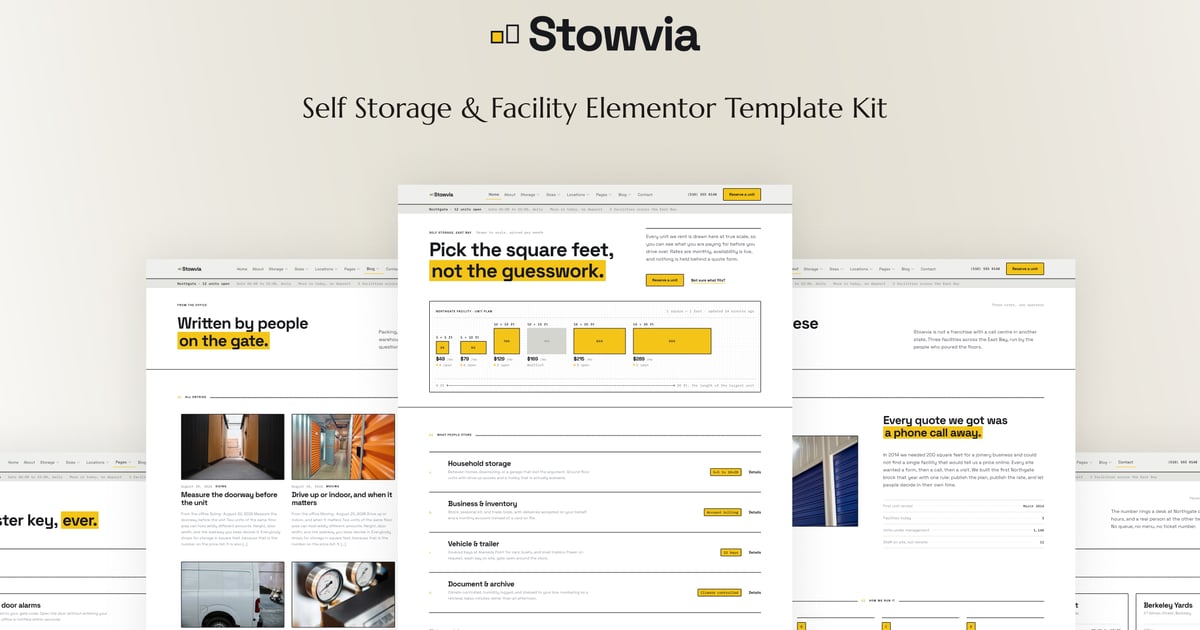
Stowvia is an Elementor template kit built for self storage operators, storage facilities, and multi site storage groups that would rather answer a question than collect a lead. Every unit size is drawn to scale with its dimensions, its monthly rate and whether it is available, so nobody has to fill in a quote form to find out what a 10×20 costs. A size guide answers the question people actually ask, which is what fits in a 5×10 and what does not, room by room. Each facility gets its own page with a floor plan, access hours, security and directions, so a customer comparing two of your sites can see the difference. There is a reservation flow that asks for size, facility and move in date and nothing else, packing supplies with prices on them, an access and security page covering gate codes, CCTV, alarms and climate control, and an FAQ that deals with contracts, notice periods, insurance and prohibited items before anyone rings to ask. The design is plain and industrial, built on the unit grid rather than stock photography, and it holds together on a phone, which is where most of this gets read, standing in a half packed flat.
The whole kit runs on free plugins. Elementor builds the layouts, ElementsKit Lite carries the header and footer, MetForm runs the reservation and enquiry forms, and Gum handles the journal listings, with no premium licence to buy. Colours and typography are wired into the Elementor global styles, so rebranding is one panel and a minute rather than an afternoon of page edits. Import, add your unit sizes and rates and a set of photographs of your own buildings, and launch. Ideal for single site self storage, multi site storage groups, container and yard storage, document and archive storage, and vehicle and boat storage operators who need a site as orderly as their facility.
Important: This is an Elementor Template Kit. Do not use WordPress “Tools > Import”. Install the Template Kit Import plugin (Plugins > Add New), then go to Tools > Template Kit to import.
Features:
- For Self Storage & Facility
- Fully With Elementor Free Version (Elementor Pro is not required)
- Simple, Modern and Clean Design
- No Coding Knowledge Required
- 25+ Ready To Use Templates
- Easy & Fully Customizable
Templates Include:
- Global Kit Style
- Home
- About
- Storage Solutions
- Storage Detail
- Unit Sizes & Pricing
- Size Guide
- Locations
- Facility Detail
- Reserve a Unit
- Business Storage
- Packing Supplies
- Access & Security
- Reviews
- FAQ
- Blog
- Single Blog
- Contact Us
- Coming Soon
- 404
- Header
- Footer
- Metform Reserve a Unit
- Metform Contact
- Metform Notify Me
Plugins installed with kit:
- ElementsKit Lite
- Gum Elementor Kit
- MetForm
How to Use Template Kits:
This is not a WordPress Theme. Template kits contain the design data for Elementor only and are installed using the Template Kit Import plugin for WordPress.
Install and import kits via Tools > Template Kit after installing the “Template Kit Import” plugin (Plugins > Add New > search “Template Kit Import” by Envato).
- Plugins > Add New → search “Template Kit Import” (by Envato) → Install & Activate
- Go to Tools > Template Kit
- Upload your Template Kit ZIP
- Click “Install Requirements”
- Import “Global Kit Styles” first, then the pages/parts you need
Help & Support
Need more help? Choose an option below:
- Full Guide: https://help.market.envato.com/hc/en-us/articles/36033428836889-How-to-Upload-Install-Elementor-Template-Kits-from-Envato
- Contact Us: https://themeforest.net/user/codeinsolutions#message
For further support, go to Elementor > Get Help in WordPress menu.
How To Import Metform Custom Form
- Import metform template
- Import the template where the form appears, then edit in Elementor
- Click the Metform widget in the column where the form should be and click Edit Form
- Select New, leave blank selected then click Edit Form button
- Click ‘Add Template’ grey folder button
- Click ‘My Templates’ tab
- Choose your imported metform template, then click ‘Insert’
- Once the template is loaded, click ‘Update’
Setup Header in ElementsKit Lite
If you have Elementor Pro, setup headers and footers in Theme Builder. Pages you create with Elementor must have the Page Layout set to Elementor Full width for the global header and footer to appear.
- Go to ElementsKit > Header Footer
- If prompted to go through the wizard, click Next all the way through and then return to step 1 (you are not required to enter your email address or share your information)
- Click Add New Template button at the top
- Name your template, then toggle “Activate/Deactivate:” to On
- Click the gray Edit Content button. Elementor will open.
- Click the gray folder icon to access My Templates tab and Insert the header or footer template.
- Customize and Publish
Images
This Template Kit uses demo images from Envato Elements. You will need to license these images from Envato Elements to use them on your website, or you can substitute them with your own.
- https://app.envato.com/shared/workspaces/8959e08d-4254-433a-95d9-fca6b59612b7
FAQ
- Can I import via WordPress “Tools > Import”? No. That importer handles WXR posts/pages. This is an Elementor Template Kit and must be imported with the Template Kit Import plugin via Tools > Template Kit.
- Do I need Elementor Pro? No, this kit is built for Elementor Free unless otherwise noted.
- My pages don’t look like the demo. Go to Tools > Template Kit and click “Install Requirements”, then import “Global Kit Styles” first before importing pages/parts.