Description
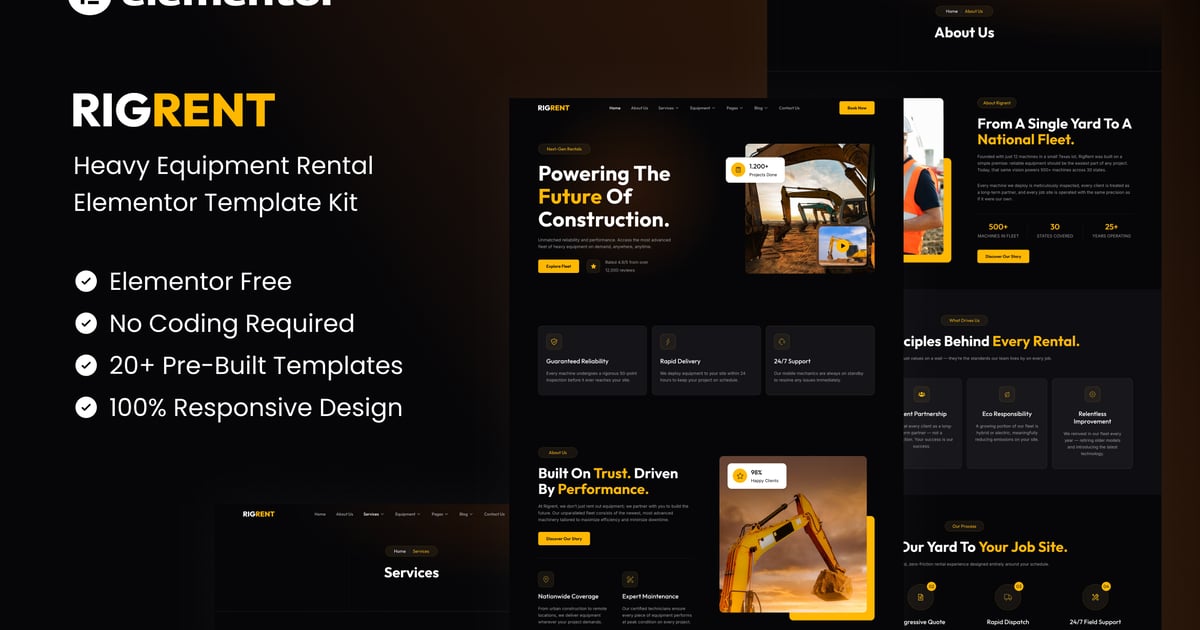
Rigrent is a bold, modern and fully responsive Elementor Template Kit built specifically for heavy equipment rental companies, construction businesses and industrial machinery services. With a striking dark theme, powerful typography and a yellow accent color system, Rigrent helps your business communicate reliability, power and professionalism to every potential client.
Rigrent includes 20+ pre-built templates covering every page your heavy equipment rental business needs — from homepage and service pages to fleet catalog, pricing, blog and contact. Built with free Elementor widgets only, zero coding required and 100% drag and drop customizable, making Rigrent the most complete heavy equipment rental Elementor template kit on ThemeForest today.
Important: This is an Elementor Template Kit. Do not use WordPress “Tools > Import”. Install the Template Kit Import plugin (Plugins > Add New), then go to Tools > Template Kit to import.
Features:
- For Heavy Equipment Rental
- Fully With Elementor Free Version (Elementor Pro is not required)
- Simple, Modern and Clean Design
- No Coding Knowledge Required
- 20+ Ready To Use Templates
- Easy & Fully Customizable
Templates Include:
- Global Kit Style
- Home
- About Us
- Services
- Service Detail
- Equipment
- Equipment Detail
- Our Team
- Pricing
- Career
- Testimonials
- Blog
- Single Blog
- FAQ
- Contact Us
- Metform Contact
- 404 Page
- Coming Soon
- Header
- Footer
Plugins installed with kit:
- Jeg Elementor Kit
- MetForm
### How to Use Template Kits:
This is not a WordPress Theme. Template kits contain the design data for Elementor only and are installed using the envato Template Kit Import plugin for WordPress or directly through Elementor.
Detailed Guide:
https://help.market.envato.com/hc/en-us/articles/36033428836889-How-to-Upload-Install-Elementor-Template-Kits-from-Themeforest-to-WordPress
For further support, go to Elementor > Get Help in WordPress menu.
For further support, go to Elementor > Get Help in WordPress menu.
How To Import Metform Custom Form
- Import metform template
- Import the template where the form appears, then edit in Elementor
- Click the Metform widget in the column where the form should be and click Edit Form
- Select New, leave blank selected then click Edit Form button
- Click ‘Add Template’ grey folder button
- Click ‘My Templates’ tab
- Choose your imported metform template, then click ‘Insert’
- Once the template is loaded, click ‘Update’
How to setup header in Jeg Elementor Kit plugin
If you have Elementor Pro, headers and footers may be customized under Theme Builder.
- Go to Jeg Elementor Kit menu item > Header Template
- Click Add New Header
- Add condition > All Site and click Create
- Click the pencil icon to Edit and elementor will appear
- Click gray folder icon to access My Templates tab
- Insert the header template.
- Customize and Save.
Images
This Template Kit uses demo images from Envato Elements. You will need to license these images from Envato Elements to use them on your website, or you can substitute them with your own.
- https://app.envato.com/shared/workspaces/f985d423-25e4-4884-9113-37898bc344e0