Description
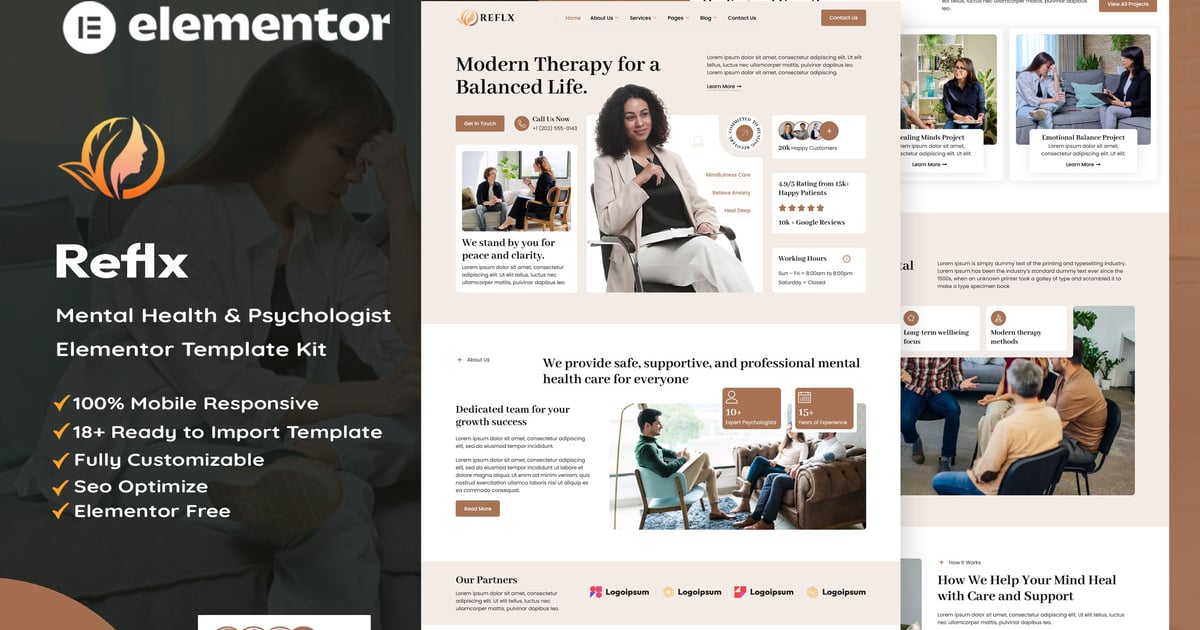
Reflx is a premium, clean, and modern Elementor Template Kit specifically crafted for Mental Health, Psychology, and Counseling services. Designed with empathy and professionalism in mind, this kit provides a calming user experience, making it perfect for therapists, life coaches, and wellness centers looking to establish a strong online presence.
Whether you are a professional psychologist, a meditation trainer, or running a mental health clinic, Reflx offers a seamless, “ready-to-use” solution. It is fully optimized for performance and conversions, helping you turn visitors into clients with strategically placed Call-to-Action (CTA) sections.
This Template Kit contains page content for creating Elementor pages. This kit has been optimized for use with the free “Hello Elementor” theme.
### Ideal For :
- Psychologists & Psychiatrists
- Mental Health Clinics & Counseling Centers
- Life & Health Coaches
- Therapy & Rehabilitation Services
- Meditation & Wellness Experts
- Personal Trainers & Health Professionals
### Key Features :
- Modern & Compassionate Design: A professional aesthetic that builds trust with patients.
- Fully Responsive: 100% Mobile-friendly, ensuring a perfect look on all devices.
- SEO Optimized: Built with clean structures to help your site rank higher on search engines.
- Lead Generation Focused: Effective layouts designed to capture leads and boost conversions.
- No Coding Required: Easily customizable using the Elementor drag-and-drop builder.
- Cross-Browser Compatible: Works perfectly across Chrome, Firefox, Safari, and Edge.
### Layout Features :
- Modern and Professional design
- Cross Browser Compatibility
- Using Free Plugins (Elementor Pro is not required)
- 100% Responsive & mobile-friendly
- 16+ Page templates ready to use
- Customize fonts and colors in one place (Global Kit Style)
### What’s Included in the Zip :
- Home
- Services
- Service Details
- About us
- Our team
- Pricing
- Contact
- Blog
- Single Post
- FAQs
- Error 404
- Header v1
- Footer v1
- Metform – Contact
- Metform – Newsletter
### Plugins installed with kit
- Elementor
- ElementsKit Lite
- Xpro Addons
- Skyboot
- MetForm
How to Import MetForm Custom Form:
- While edititing a page where a form should appear, open the Elementor navigator to locate the Metform widget.
- Click Edit Form in the builder panel.
- Select New, leave blank selected then click Edit Form button.
- Click ‘Add Template’ grey folder button.
- Click ‘My Templates’ tab.
- Choose your imported MetForm template, then click ‘Insert’.
- Once the template is loaded, click ‘Update’.
Setup Header in ElementsKit Lite
If you have Elementor Pro, setup headers and footers in Theme Builder. Pages you create with Elementor must have the Page Layout set to Elementor Full width for the global header and footer to appear.
- Go to ElementsKit > Header Footer
- If prompted to go through the wizard, click Next all the way through and then return to step 1 (you are not required to enter your email address or share your information)
- Click Add New Template button at the top
- Name your template, then toggle “Activate/Deactivate:” to On
- Click the gray Edit Content button. Elementor will open.
- Click the gray folder icon to access My Templates tab and Insert the header or footer template.
- Customize and Publish
Images: This Template Kit uses demo images from Envato Elements. You will need to license these images from Envato Elements to use them on your website, or you can substitute them with your own.
https://elements.envato.com/collections/NET3K9J6B7