Description
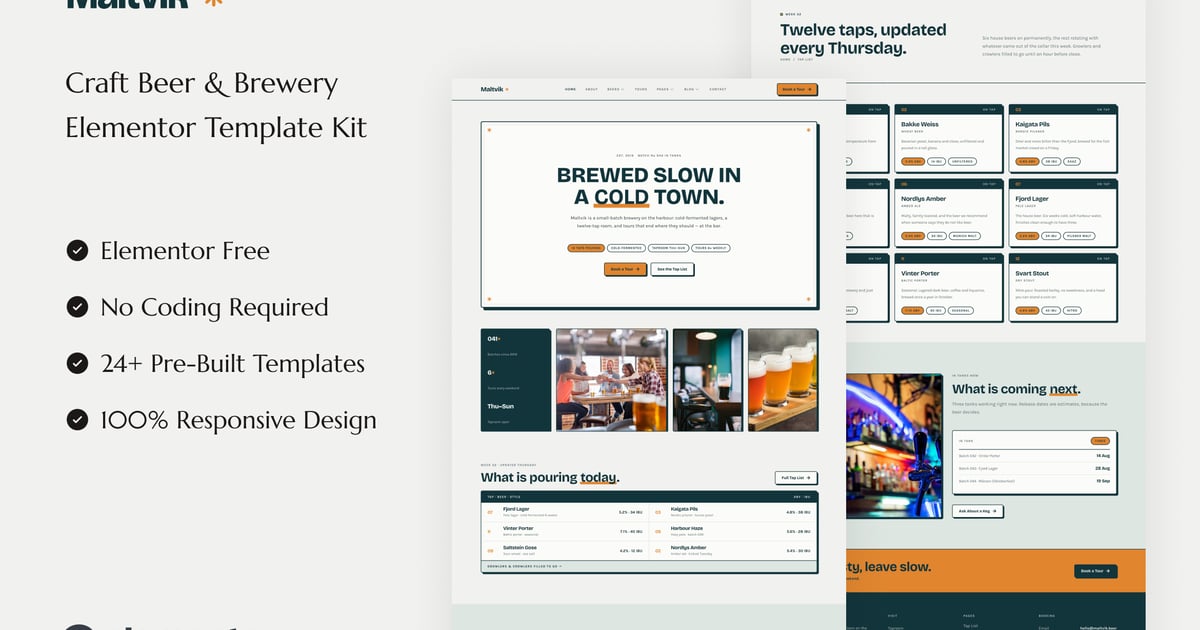
Maltvik is an Elementor template kit for craft breweries, taprooms, brewpubs and beer bars. The design takes its cues from printed label stock rather than the usual brewery shorthand: cool birch paper, deep petrol ink, two pixel borders, hard offset shadows with no blur, and a single amber accent so the beer is the only warm thing on the page. No chalkboards, no vintage badges, no grunge texture. The result is light, cold and graphic, which lets a tap list read like a well set menu and a beer name read the way it would look printed on the can. If your brewery is more Nordic brewhouse than roadside saloon, this is the kit that already looks like you.
Every template is built with the free version of Elementor, so there is no page builder license to buy. Colors and typography run through Elementor global styles, which means you can rebrand the entire kit from one panel and every heading, border and button follows. Layouts are responsive and were measured at desktop, laptop, tablet and phone widths rather than scaled down and hoped for. Type, spacing and borders hold together from the widest hero to the smallest chip, so the kit still looks designed once you have replaced the demo content with your own. Import it into any Elementor site, drop in your photography, and open the doors.
Important: This is an Elementor Template Kit. Do not use WordPress “Tools > Import”. Install the Template Kit Import plugin (Plugins > Add New), then go to Tools > Template Kit to import.
Features:
- For Craft Beer & Brewery
- Fully With Elementor Free Version (Elementor Pro is not required)
- Simple, Modern and Clean Design
- No Coding Knowledge Required
- 24+ Ready To Use Templates
- Easy & Fully Customizable
Templates Include:
- Global Kit Style
- Home
- About
- Beers
- Beer Detail
- Tours
- Taproom
- Events
- Gallery
- Pricing
- Book a Tour
- Team
- Testimonials
- FAQ
- Blog
- Single Blog
- Contact Us
- Coming Soon
- 404 Page
- Metform Contact
- Metform Booking
- Metform Notify Me
- Header
- Footer
Plugins installed with kit:
- ElementsKit Lite
- Gum Elementor Kit
- MetForm
How to Use Template Kits:
This is not a WordPress Theme. Template kits contain the design data for Elementor only and are installed using the Template Kit Import plugin for WordPress.
Install and import kits via Tools > Template Kit after installing the “Template Kit Import” plugin (Plugins > Add New > search “Template Kit Import” by Envato).
- Plugins > Add New → search “Template Kit Import” (by Envato) → Install & Activate
- Go to Tools > Template Kit
- Upload your Template Kit ZIP
- Click “Install Requirements”
- Import “Global Kit Styles” first, then the pages/parts you need
Help & Support
Need more help? Choose an option below:
- Full Guide: https://help.market.envato.com/hc/en-us/articles/36033428836889-How-to-Upload-Install-Elementor-Template-Kits-from-Envato
For further support, go to Elementor > Get Help in WordPress menu.
How To Import Metform Custom Form
- Import metform template
- Import the template where the form appears, then edit in Elementor
- Click the Metform widget in the column where the form should be and click Edit Form
- Select New, leave blank selected then click Edit Form button
- Click ‘Add Template’ grey folder button
- Click ‘My Templates’ tab
- Choose your imported metform template, then click ‘Insert’
- Once the template is loaded, click ‘Update’
Setup Header in ElementsKit Lite
If you have Elementor Pro, setup headers and footers in Theme Builder. Pages you create with Elementor must have the Page Layout set to Elementor Full width for the global header and footer to appear.
- Go to ElementsKit > Header Footer
- If prompted to go through the wizard, click Next all the way through and then return to step 1 (you are not required to enter your email address or share your information)
- Click Add New Template button at the top
- Name your template, then toggle “Activate/Deactivate:” to On
- Click the gray Edit Content button. Elementor will open.
- Click the gray folder icon to access My Templates tab and Insert the header or footer template.
- Customize and Publish
Images
This Template Kit uses demo images from Envato Elements. You will need to license these images from Envato Elements to use them on your website, or you can substitute them with your own.
- https://app.envato.com/shared/workspaces/ee33fd70-dfbe-4918-a37b-25ae87076abc