Description
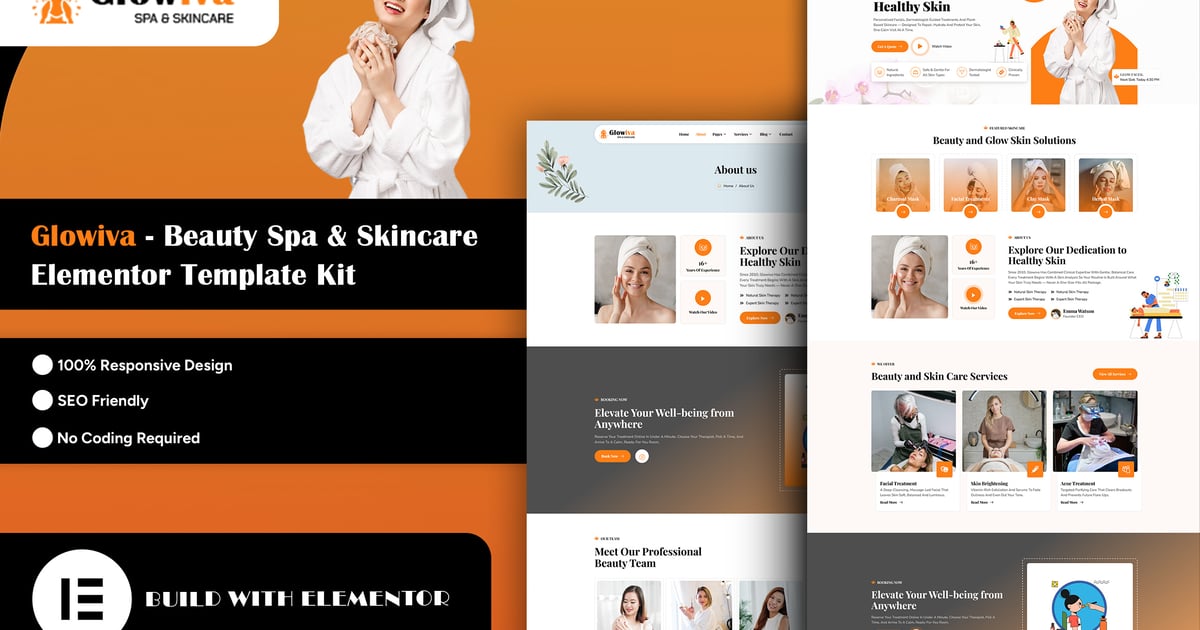
Glowiva – Beauty Spa & Skincare Elementor Template Kit
Glowiva is a modern and professionally designed Elementor Template Kit created specifically for beauty salons, skincare clinics, spa centers, wellness studios, beauty specialists, and personal care businesses. It provides everything you need to build a beautiful, professional, responsive, and visually engaging website without writing a single line of code.
Glowiva features a clean, elegant, and beauty-focused design with a fully responsive layout. It is retina-ready and easy to customize using Elementor, allowing you to effortlessly change colors, typography, layouts, images, and content without any coding knowledge.
Elementor Template Kits include fully designed page content exclusively for the Elementor builder. Glowiva is optimized for use with the free Hello Elementor theme and is fully compatible with most WordPress themes that support Elementor.
Perfect For :
- Beauty Salons & Beauty Studios
- Day Spas & Wellness Centers
- Skincare & Facial Clinics
- Beauty & Personal Care Services
- Massage & Relaxation Centers
- Cosmetic & Aesthetic Businesses
- Beauty Specialists & Skincare Experts
- Wellness & Self-Care Businesses
Layout Features :
- Modern, Elegant & Beauty-Focused Design
- Fully Responsive & Mobile-Friendly Layout
- Cross-Browser Compatibility
- Built with Elementor – No Coding Required
- Easy to Customize and Reuse
- Clean & Well-Organized Layouts
- Customize Fonts and Colors Using Global Kit Styles
- Retina-Ready Design
- Modern Typography & Beautiful Visual Elements
- Conversion-Focused Call-to-Action Sections
What’s Included in the Zip:
- Home
- About Us
- Our Team
- Testimonials
- Pricing
- FAQ
- Error
- Services
- Service Details
- Gallery
- Blog
- Blog Details
- Contact
- MetForm
- Header
- Footer
Plugins Installed with Kit:
- Elementor
- ElementsKit Lite
- Skyboot Custom Icons for Elementor
- Qi Addons for Elementor
- MetForm
How to Use Template Kits:
This is not a WordPress Theme. Template Kits contain the design data for Elementor only and are installed using the Envato Elements plugin for WordPress or directly through Elementor.
- Download your kit file from Envato and do not unzip it. If you use Safari browser, you may need to ensure “Open safe files after downloading” is disabled in the browser preferences.
- Go to Settings > Permalinks and ensure Post Name is selected.
- Go to Appearance > Themes > Add New and ensure Hello Elementor is installed and activated. This will prompt you to install Elementor if you haven’t already.
- Go to Plugins and ensure Elementor and Envato Elements are installed and updated to the latest version. If your kit requires Elementor Pro, it must be installed and connected to your account.
- Go to Elements > Installed Kits and click Upload Template Kit Zip, or click your kit to view it.
- Check for the orange banner at the top and click Install Requirements to load any plugins used by the kit. [Install Requirements Guide](https://envato.d.pr/ughD8Q)
- Import the Global Kit Styles first. This will set up the site’s global colors, fonts, and other design settings.
- Import one template at a time in the order shown. Imported templates are stored in Elementor under Templates > Saved Templates and can be reused whenever needed.
Creating Pages:
- Go to Pages and create a new page, then click Edit with Elementor.
- Click the gear icon at the lower-left of the Elementor builder to view Page Settings. Choose Elementor Full Width and hide the page title.
- Click the gray folder icon to access the My Templates tab, then import the page template you want to customize.
- Set the Home page under Settings > Reading by selecting a Static Front Page.
Detailed Guide:
[How to Upload & Install Elementor Template Kits](https://help.market.envato.com/hc/en-us/articles/36033428836889-How-to-Upload-Install-Elementor-Template-Kits-from-Themeforest-to-WordPress)
For further support, go to Elementor > Get Help in the WordPress menu.
How to Import Metforms:
- Import the MetForm block templates.
- Import the page template where the form appears and right-click to enable the Navigator.
- Locate and select the MetForm widget and click Edit Form. Choose New, then Edit Form. The builder will appear.
- Click the ‘Add Template’ grey folder icon.
- Click the ‘My Templates’ tab.
- Choose your imported MetForm template, then click ‘Insert’ (click No for page settings).
- Once the template is loaded, make any desired customizations and click ‘Update & Close’. The form will appear in the template.
- Click Update.
Setup Global Header and Footer in ElementsKit Template:
- Go to ElementsKit > Header Footer from your WordPress dashboard.
- Click Add New to create a new Header or Footer template.
- Enter a suitable template name, such as Glowiva Header or Glowiva Footer.
- Select the template type as Header or Footer.
- Set the display condition to Entire Site to apply the Header or Footer globally across your website.
- Click Edit with Elementor and import the Header or Footer template from Templates > Saved Templates.
- Customize the logo, navigation menu, contact information, buttons, colors, typography, and other content as needed.
- Click Publish or Update to save your changes.
- Visit your website and verify that the Header or Footer is displayed correctly across all pages.
Note:
Make sure the ElementsKit Lite plugin is installed and activated before setting up the global Header and Footer. If the Header or Footer does not appear correctly, check the display conditions and ensure that the template is enabled.
Images Photos from Unsplash,freepik and Pexels are provided for demo purposes and may be replaced with your own.