Description
Automexa – AI Marketing & Automation Agency Elementor Template Kit ——————————
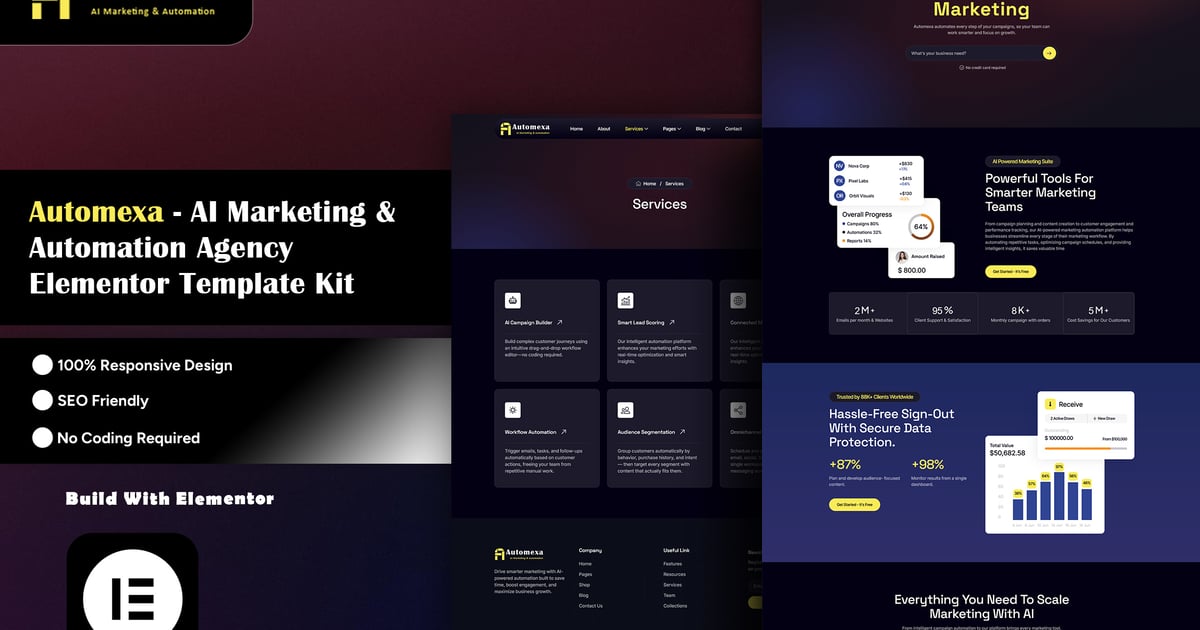
Automexa is a modern, conversion-focused Elementor template kit built specifically for AI marketing agencies, automation consultants, martech SaaS companies, digital marketing agencies, and growth-hacking studios. As artificial intelligence reshapes the marketing industry, businesses need a website that instantly communicates innovation, trust, and technical credibility — Automexa delivers exactly that.
With a sleek dark-themed design, bold yellow accents, animated data visual elements, and clean typography, Automexa positions your brand as a forward-thinking, tech-driven agency. Every section — from the hero banner to the pricing tables — is crafted to highlight AI capabilities, automation workflows, campaign performance, and client trust, helping you convert visitors into leads and leads into clients.
Built 100% with Elementor and powered by lightweight, reliable addons, Automexa is beginner-friendly, fully customizable, and ready to launch in minutes — no coding required.
Top Highlights
- 100% Built With Elementor Page Builder
- Fully Responsive & Retina Ready Design
- Modern Dark UI With Clean, Professional Layout
- Drag & Drop Easy Customization — No Coding Required
- Global Header & Footer (Edit Once, Applies Everywhere)
- Functional Contact Form Powered By MetForm
- SEO Friendly & Fast Loading Structure
- Cross-Browser Compatible
- Well Organized & Clean Code
- Lifetime Free Updates
Features
- Eye-Catching Hero Section With AI-Themed Visuals
- Animated Marquee / Logo Slider Sections
- Interactive Stats & Progress Counters
- Service & Feature Grid Layouts With Custom Icons
- Team Member Showcase Section
- Client Testimonial Slider
- Pricing Tables With Monthly/Yearly Toggle
- Blog & Blog Details Layout
- Custom 404 Error Page
- Newsletter Signup Section
- Social Media Integration Icons
- Smooth Scroll Animations
Templates Included
- Global Kit Style
- Home Page
- About Page
- Services Page
- Service Details Page
- Pricing Page
- Our Team Page
- Testimonial Page
- Blog Page
- Blog Details Page
- Contact Page
- 404 Error Page
- Header
- Footer
- Contact Form
- Newsletter Form
Perfect For
- AI Marketing Agencies
- Marketing Automation Companies
- Digital Marketing Agencies
- SaaS & Martech Startups
- Social Media Marketing Agencies
- Growth Hacking & Consulting Agencies
- Freelance Digital Marketers & Consultants
- Business Automation Service Providers
Required Plugins
- Elementor (Free) — Core Page Builder
- ElementsKit Lite (Free) — Widgets & Global Header/Footer
- Jeg Kit For Elementor (Free) — Advanced Widgets
- Marquee Addons For Elementor (Free) — Scrolling Marquee Sections
- Skyboot Custom Icons For Elementor (Free) — Custom Icon Sets
- MetForm (Free) — Contact & Custom Forms
All required plugins are free and available on WordPress.org.
How To Use This Template Kit ?
This is not a WordPress Theme. This Template Kit contains design data for Elementor only, and is installed using the Envato Elements plugin for WordPress or directly through Elementor.
- Download your kit file from Envato and do not unzip it. If you use Safari browser, make sure “Open safe files after downloading” is disabled in your browser preferences.
- Go to Settings → Permalinks and ensure Post Name is selected.
- Go to Appearance → Themes → Add New and ensure Hello Elementor is installed and activated. This will prompt you to install Elementor if you haven’t already.
- Go to Plugins and ensure Elementor are installed and updated to the latest version. If your kit requires Elementor Pro, it must be installed and connected to your account.
- Go to Elements → Installed Kits and click Upload Template Kit Zip, or click on your kit to view it.
- Check for the orange banner at the top and click Install Requirements to load all required plugins used by the kit (Elementor, ElementsKit Lite, Jeg Kit For Elementor, Marquee Addons For Elementor, Skyboot Custom Icons For Elementor, MetForm). [Install Requirements Guide](https://envato.d.pr/ughD8Q)
- Import the Global Kit Styles first. This will set up the site’s global colors, fonts, and other design settings.
- Import one template at a time in the order shown. Imported templates are stored under Templates → Saved Templates in Elementor and can be reused whenever needed.
- Once imported, assign the Home page under Settings → Reading → Static Page.
- Set up the Global Header & Footer via ElementsKit Lite (see guide below).
- Configure the MetForm contact form (see guide below).
- Replace all demo content, images, and text with your own branding.
Setup Global Header & Footer In ElementsKit Lite
- Install and activate ElementsKit Lite from the WordPress Plugin Directory.
- Go to ElementsKit → Header Footer Builder from your WordPress dashboard.
- Click Add Header or Add Footer, then edit it with Elementor.
- If the Header/Footer templates were imported with the main kit, select them from the My Templates tab within the builder.
- Set the Display Conditions to “Entire Website” so the header and footer appear globally on all pages.
- Click Publish/Save — your global header and footer will now automatically appear across every page.
- To make changes later, simply edit the header/footer once from the Header Footer Builder, and updates will reflect site-wide instantly.
Note:
Make sure the ElementsKit Lite plugin is installed and activated before setting up the global Header and Footer. If the Header or Footer does not appear correctly, check the display conditions and ensure that the template is enabled.
How To Import MetForm Custom Form
- Install and activate the MetForm plugin from the WordPress Plugin Directory.
- Go to MetForm → All Forms in your WordPress dashboard.
- If the contact form was included in the main kit import, it will already appear in your form list — simply open it to review or edit the fields.
- If not auto-imported, click Add New Form, then use the pre-built “Contact Form” layout and rebuild the fields to match the demo (Name, Email, Subject, Message).
- Open the Contact page in Elementor Editor, locate the MetForm widget, and select your form from the dropdown under the widget settings.
- Configure the email notification settings under the form’s Actions After Submit tab to receive submissions at your desired email address.
- Save and test the form by submitting a sample entry.
Creating Pages
- Go to Pages and create a new page, then click Edit with Elementor.
- Click the gear icon at the lower-left of the Elementor builder to view Page Settings. Choose Elementor Full Width and hide the page title.
- Click the gray folder icon to access the My Templates tab, then import the page template you want to customize.
- Set the Home page under Settings > Reading by selecting a Static Front Page.
Detailed Guide:
[How to Upload & Install Elementor Template Kits](https://help.market.envato.com/hc/en-us/articles/36033428836889-How-to-Upload-Install-Elementor-Template-Kits-from-Themeforest-to-WordPress)
For further support, go to Elementor > Get Help in the WordPress menu.
Images:
This Template Kit uses demo images from Envato Elements. You will need to license these images from Envato Elements to use them on your website, or you can substitute them with your own images.
View Envato Elements Collection
https://elements.envato.com/collections/4PDCNKV3BY?utm_source=my_collection&utm_medium=link&utm_campaign=share_collection