Description
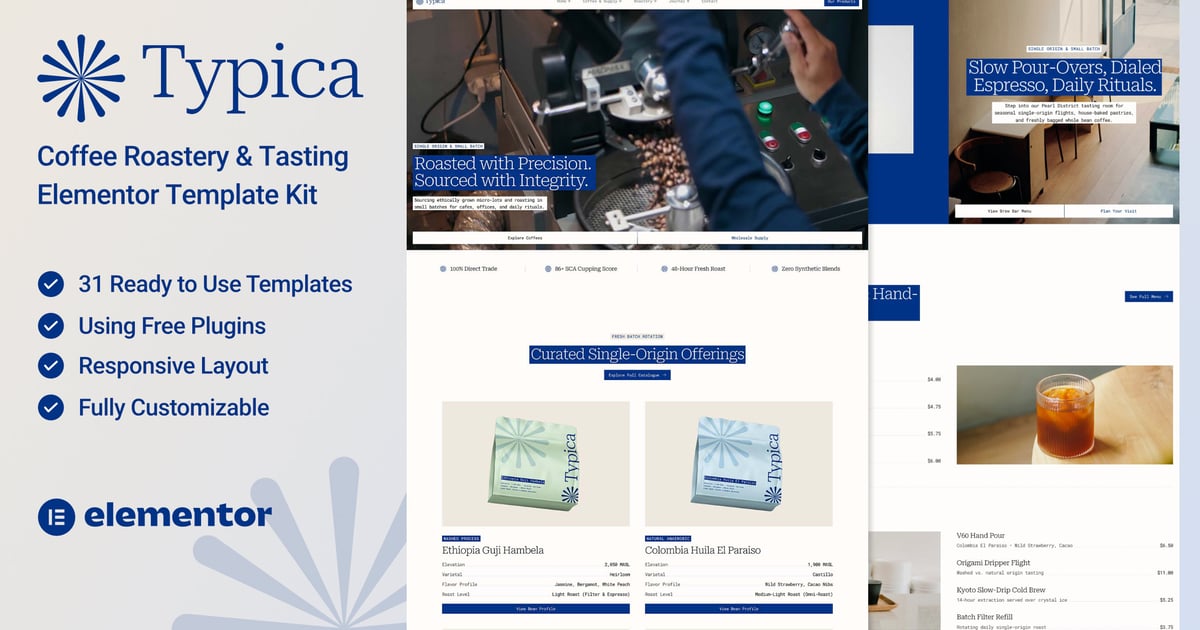
Typica – Coffee Roastery & Tasting Room Elementor Template Kit is a modern, editorial Elementor Template Kit crafted for specialty coffee roasters, artisanal micro-roasteries, tasting rooms, third-wave cafes, and B2B wholesale coffee suppliers. Please note: This is an Elementor Template Kit, not a standalone WordPress theme.
Designed with structured Flexbox grid layouts, clean typography, and a conversion-focused flow, Typica makes it simple to showcase seasonal single-origin offerings, daily brew bar menus, weekly cupping sessions, and commercial wholesale programs without relying on Elementor Pro or heavy e-commerce plugins.
Typica includes 20 Ready-to-Use Pages and 30 Ready-to-Use Templates (including 4 custom Mega Menu layouts and 4 MetForm templates), giving you everything needed to launch a complete specialty coffee website in clicks.
Key Features
- Built with Free Elementor (Elementor Pro is not required)
- Editorial, minimalist container-grid architecture
- 20 Ready-to-Use Pages (including dual B2B Roastery and Cafe Homepages)
- 30 Ready-to-Use Templates (with 4 Mega Menu blocks and 4 MetForm layouts)
- Lightweight single-origin showcase with zero WooCommerce bloat
- Fully responsive across desktop, tablet, and mobile viewports
- Centralized Global Theme Styles for rapid color and font customization
- Cross-browser compatible with Chrome, Firefox, Safari, and Edge
Templates Included (30 Total)
- Global Theme Style
- Home 01 (Roastery & B2B Flagship)
- Home 02 (Tasting Room & Cafe)
- About
- Catalogue (Current Roasts)
- Menu (Brew Bar Menu)
- Pricing
- Wholesale & Supply
- Cuppings & Workshop
- Visit & Location
- Team
- Team Details
- Career
- Career Details
- Testimonials
- FAQs
- Journal
- Single Post
- Contact
- Coming Soon
- 404 Page
- Header
- Footer
- Mega Menu – Home
- Mega Menu – Coffee & Supply
- Mega Menu – Roastery
- Mega Menu – Journal
- Form Newsletter
- Form Wholesale
- Form Cupping & Workshop
- Form Contact
Required Core Plugins
- Elementor (Free)
- ElementsKit Lite
Optional Plugins
- MetForm (For Wholesale, Cupping, Contact, and Newsletter forms)
- Gum Elementor Addon (For Single Post dynamic elements)
How to Use Template Kits
- Download your kit file and do not unzip it. If you use Safari, disable “Open safe files after downloading” in your browser preferences before downloading.
- In your WordPress Dashboard, go to Settings → Permalinks and select Post Name.
- Go to Appearance → Themes → Add New, install, and activate the Hello Elementor theme.
- Go to Plugins → Add New and ensure Elementor and the Envato Elements (or Template Kit Import) plugin are installed and updated to the latest version.
- Go to Elements → Installed Kits (or Tools → Template Kits) and upload your Template Kit zip file.
- Click Install Requirements in the orange banner at the top to install and activate the required plugins.
- Import Global Kit Styles first to configure your global colors, typography, and layout tokens.
- Import one template at a time in the order listed. Imported templates are stored under Templates → Saved Templates.
Creating Pages
- Go to Pages → Add New, give your page a title, and click Edit with Elementor.
- Click the gear icon in the bottom-left corner of the Elementor panel, set Page Layout to Elementor Full Width, and toggle Hide Title to Yes.
- Click the gray folder icon on the canvas, open the My Templates tab, and click Insert on your chosen page template.
- Set your homepage under Settings → Reading by selecting A static page and choosing Home 01 or Home 02.
Enabling Flexbox Container
- In your WordPress Dashboard, go to Elementor → Settings → Features.
- Locate Flexbox Container and set it to Active.
- Click Save Changes at the bottom of the page.
How to Import MetForms
- Import the MetForm block templates (Form Newsletter, Form Wholesale, Form Cupping & Workshop, and Form Contact).
- Open the page template containing the form and right-click to open the Navigator.
- Select the MetForm widget, click Edit Form, choose New, and click Edit Form to launch the builder.
- Click the gray Add Template folder icon, open My Templates, and insert your matching imported form template (select No for page settings).
- Click Update & Close, then click Update on the main page.
Setting Up Global Header and Footer
- Import the Header and Footer templates.
- Go to ElementsKit → Header Footer, select Header, and click Add New.
- Enter a title, set Conditions to Entire Site, toggle Activation to On, and click Edit Content.
- Click the gray folder icon, open My Templates, insert the Header template, and click Update.
- Repeat the same steps for the Footer template.
Setting Up the Mega Menu (ElementsKit Lite)
- Import the four Mega Menu section templates (Mega Menu – Home, Mega Menu – Coffee & Supply, Mega Menu – Roastery, and Mega Menu – Journal).
- Go to Appearance → Menus, create or select your primary menu, check Enable this menu for Megamenu content, and click Save Menu.
- Hover over a parent menu item (Home, Coffee & Supply, Roastery, or Journal) and click the Mega Menu button.
- Toggle Mega Menu to Enabled, set Mega Menu Width to Custom Width (1200px) and Position to Relative, then click Edit Mega Menu Content.
- Inside the Elementor editor, click the gray folder icon, open My Templates, insert the matching Mega Menu template, and click Update.
- Close the popup window and click Save Changes. For additional step-by-step details, refer to the official WPmet ElementsKit Mega Menu documentation.
Image Licensing Note
This Template Kit uses demo photography from Envato Elements. You can license these images directly through your active Envato Elements subscription to use them on your live website, or replace them with your own photography.
- https://app.envato.com/shared/workspaces/44d76287-64ee-4dc8-a8ba-bd6bb2903be0