Description
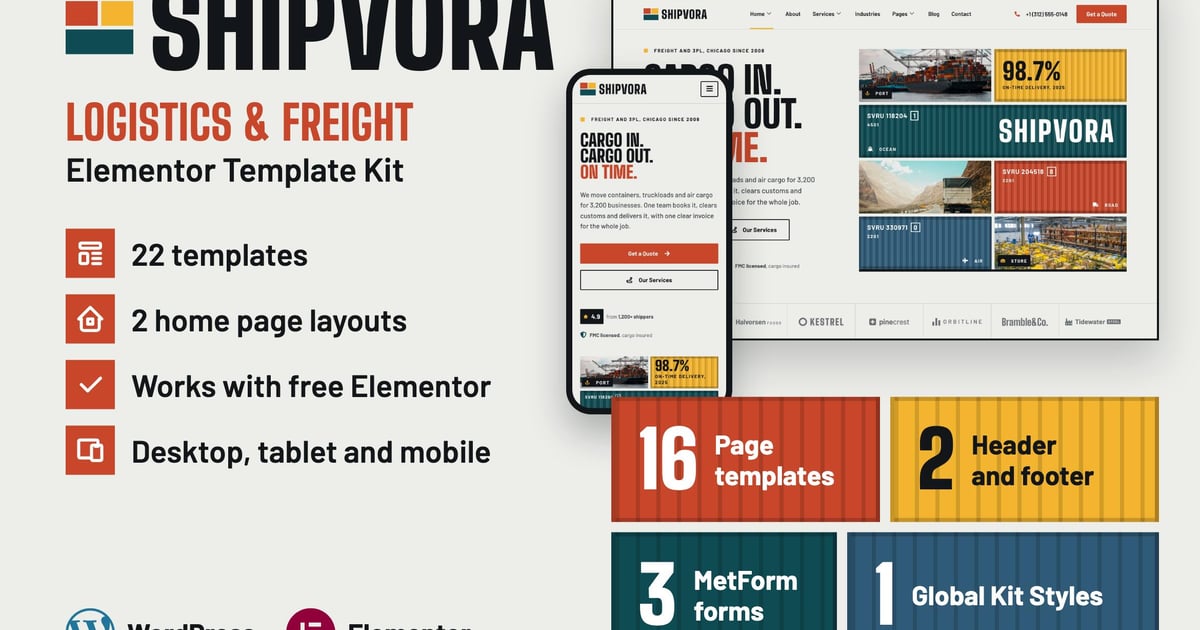
Shipvora is an Elementor Template Kit for freight forwarders, trucking firms, 3PL providers, customs brokers and courier services, with a design built on stacked shipping containers.
This is not a WordPress theme. Template Kits contain the design data for Elementor only, and are installed with the Envato Template Kit Import plugin for WordPress.
Features
- 22 templates: 16 pages, a header, a footer, 3 form blocks and the Global Kit Styles
- Works with free Elementor (Elementor Pro is not required)
- Built with Flexbox Containers and Elementor’s classic widgets
- Global Colors and Global Fonts on all text and colors, so you can restyle the whole kit in Site Settings
- Working forms made with MetForm: quote request, contact and newsletter (entries are saved under MetForm > Entries)
- Working mobile menu, industry tabs and FAQ accordions
- Blog lists that show your real posts (ElementsKit Blog Posts widget)
- Designed for desktop, tablet and mobile
- 2 home page layouts
Templates included
- Global Kit Styles
- Header
- Footer
- Home
- Home 2
- About
- Services
- Service Details
- Pricing
- Industries
- Network
- Request a Quote
- Team
- Careers
- FAQ
- Contact
- Blog
- Single Post
- 404 Page
- MetForm Quote Form
- MetForm Contact Form
- MetForm Newsletter Form
Required plugins (all free, installed with the kit)
- Elementor
- ElementsKit Elementor Addons (ElementsKit Lite)
- MetForm
Fonts used (Google Fonts)
- Big Shoulders Display
- Barlow
The photos come from Unsplash and are for the demo only. They are not part of the kit download: the import loads them from the demo site, so replace them with your own photos.
Good to know (FAQ)
Do I need Elementor Pro?
No. Every template works with the free Elementor plugin.
Can I install this under Appearance > Themes?
No. A Template Kit is not a theme, so WordPress shows a “missing style.css” error. Use the Template Kit Import plugin (steps below). We recommend the free Hello Elementor theme.
My import does not look like the demo. What should I check?
Import the Global Kit Styles first. Click “Install Requirements” to install and activate the plugins. Make sure the Flexbox Container feature is active in Elementor > Settings > Features.
Does the kit include shipment tracking or live schedules?
No. Shipvora is a company website with pages and forms. It has no shipment tracking, live schedules, online booking or customer accounts, because those need your own systems. Visitors reach you through the quote and contact forms.
Where do form messages go?
MetForm saves every message under MetForm > Entries. To get them by email too, turn on the notification in each form’s settings.
Does the newsletter form send emails?
No. It saves each address under MetForm > Entries. To send a newsletter, use your own email tool.
Are the images and blog posts included?
The demo photos download from the demo site during import, so you can see the layout. Replace them with your own photos. Blog posts are not part of a Template Kit: the blog list widgets show your own posts.
How do I use the Single Post and 404 templates?
Free Elementor has no Theme Builder, so you insert these two yourself. To use Single Post, edit a post with Elementor, insert the template and replace the text. The demo posts are made this way. Other posts keep your theme’s post layout. 404 Page is a page design: free Elementor cannot set it as the real 404 page, so wrong addresses show your theme’s 404 page. With Elementor Pro, you can set both in the Theme Builder.
How to set up the header and footer (ElementsKit)
- Import the Header and Footer templates.
- Go to ElementsKit > Header Footer and click “Add New”.
- Name it “Header”, choose Type: Header and Conditions: Entire Site, turn it on and save.
- Click “Edit with Elementor”, click the gray folder icon, open “My Templates” and insert the Header template.
- In the Nav Menu widget, choose your menu. Save.
- Repeat the same steps for the Footer.
How to import the MetForm forms
- Import the three “MetForm” block templates.
- Import a page that has a form, for example Contact, and open it in Elementor.
- Right-click the form area and open the Navigator. Select the MetForm widget and click “Edit Form”.
- Choose “New”, then “Edit Form”. The form builder opens.
- Click the gray folder icon (“Add Template”), open “My Templates”, choose the matching MetForm template (for example “MetForm Contact Form”) and click “Insert”.
- Click “Update & Close”. The form now shows on the page.
- Repeat for the other forms: Contact Form (Contact, Careers), Quote Form (Home, Home 2, Service Details, Request a Quote), Newsletter Form (Footer, Blog).
How to install
- Install and activate the Template Kit Import plugin from Plugins > Add New in WordPress. Do not unzip the kit.
- Go to Tools > Template Kit and upload the kit ZIP.
- Check the orange banner at the top and click “Install Requirements” to load the required plugins.
- Click “Import” on the Global Kit Styles first. This sets the site colors and fonts.
- Click “Import” on one template at a time. They are saved in Elementor under Templates > Saved Templates.
- Go to Pages and create a new page, then click “Edit with Elementor”.
- Click the “Page Settings” icon in the top bar of the builder (next to History), and choose “Elementor Full Width” as the page layout. Hide the page title.
- Click the gray folder icon to open the “My Templates” tab, and insert the page you want to use.
For more help, search the Envato Help Center for “How to install a Template Kit”.