Description
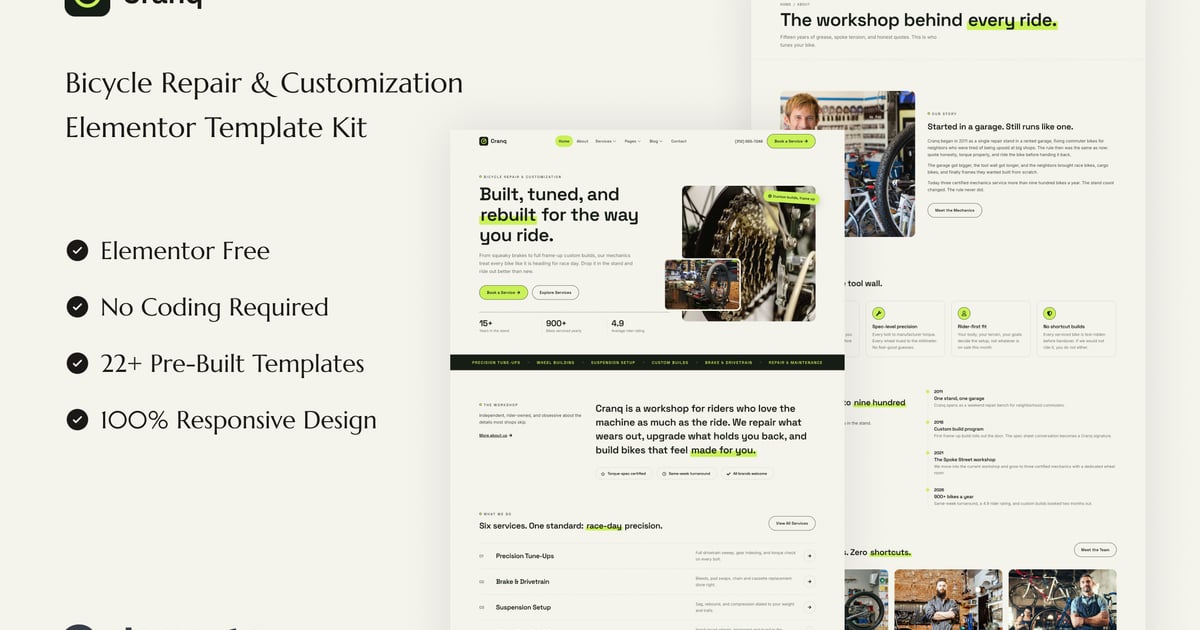
Cranq is an Elementor template kit built for bicycle repair shops, custom bike builders, and workshop studios that want their craft to show online. The design speaks to riders: a clear service menu covering tune ups, wheel builds, drivetrain overhauls and full custom builds, honest turnaround times and pricing, a booking flow that fits a busy workshop, and space to show the frames you have built. Everything reads cleanly on a phone, which is where most riders will find you after a snapped chain or a bike that has sat in the shed all winter.
The whole kit runs on free plugins. Elementor, ElementsKit, and MetForm handle the layouts, menus, and booking forms with no premium licence to buy. Colours and typography are wired into the Elementor global styles, so swapping the palette to match your shop takes one panel and a minute, not an afternoon of page edits. Import, add your workshop hours and service list, and launch. Ideal for bike shops, custom frame builders, mobile bike mechanics, e bike specialists, and cycling studios that need a site as considered as their wrenching.
Important: This is an Elementor Template Kit. Do not use WordPress “Tools > Import”. Install the Template Kit Import plugin (Plugins > Add New), then go to Tools > Template Kit to import.
Features:
- For Bicycle Repair & Customization
- Fully With Elementor Free Version (Elementor Pro is not required)
- Simple, Modern and Clean Design
- No Coding Knowledge Required
- 22+ Ready To Use Templates
- Easy & Fully Customizable
Templates Include:
- Global Kit Style
- Home
- About
- Services
- Service Detail
- Custom Builds
- Build Gallery
- Pricing
- Book Appointment
- Team
- Testimonials
- FAQ
- Blog
- Blog Single
- Contact
- Coming Soon
- 404
- Header
- Footer
- Metform Book Appointment
- Metform Contact
- Metform Notify Me
Plugins installed with kit:
- ElementsKit Lite
- Gum Elementor Kit
- MetForm
How to Use Template Kits:
This is not a WordPress Theme. Template kits contain the design data for Elementor only and are installed using the Template Kit Import plugin for WordPress.
Install and import kits via Tools > Template Kit after installing the “Template Kit Import” plugin (Plugins > Add New > search “Template Kit Import” by Envato).
- Plugins > Add New → search “Template Kit Import” (by Envato) → Install & Activate
- Go to Tools > Template Kit
- Upload your Template Kit ZIP
- Click “Install Requirements”
- Import “Global Kit Styles” first, then the pages/parts you need
Help & Support
Need more help? Choose an option below:
- Full Guide: https://help.market.envato.com/hc/en-us/articles/36033428836889-How-to-Upload-Install-Elementor-Template-Kits-from-Envato
- Contact Us: https://themeforest.net/user/codeinsolutions#message
For further support, go to Elementor > Get Help in WordPress menu.
How To Import Metform Custom Form
- Import metform template
- Import the template where the form appears, then edit in Elementor
- Click the Metform widget in the column where the form should be and click Edit Form
- Select New, leave blank selected then click Edit Form button
- Click ‘Add Template’ grey folder button
- Click ‘My Templates’ tab
- Choose your imported metform template, then click ‘Insert’
- Once the template is loaded, click ‘Update’
Setup Header in ElementsKit Lite
If you have Elementor Pro, setup headers and footers in Theme Builder. Pages you create with Elementor must have the Page Layout set to Elementor Full width for the global header and footer to appear.
- Go to ElementsKit > Header Footer
- If prompted to go through the wizard, click Next all the way through and then return to step 1 (you are not required to enter your email address or share your information)
- Click Add New Template button at the top
- Name your template, then toggle “Activate/Deactivate:” to On
- Click the gray Edit Content button. Elementor will open.
- Click the gray folder icon to access My Templates tab and Insert the header or footer template.
- Customize and Publish
Images
This Template Kit uses demo images from Envato Elements. You will need to license these images from Envato Elements to use them on your website, or you can substitute them with your own.
- https://app.envato.com/shared/workspaces/14ef6c1b-cfbc-4b0b-8471-5413142244f0
FAQ
- Can I import via WordPress “Tools > Import”? No. That importer handles WXR posts/pages. This is an Elementor Template Kit and must be imported with the Template Kit Import plugin via Tools > Template Kit.
- Do I need Elementor Pro? No, this kit is built for Elementor Free unless otherwise noted.
- My pages don’t look like the demo. Go to Tools > Template Kit and click “Install Requirements”, then import “Global Kit Styles” first before importing pages/parts.