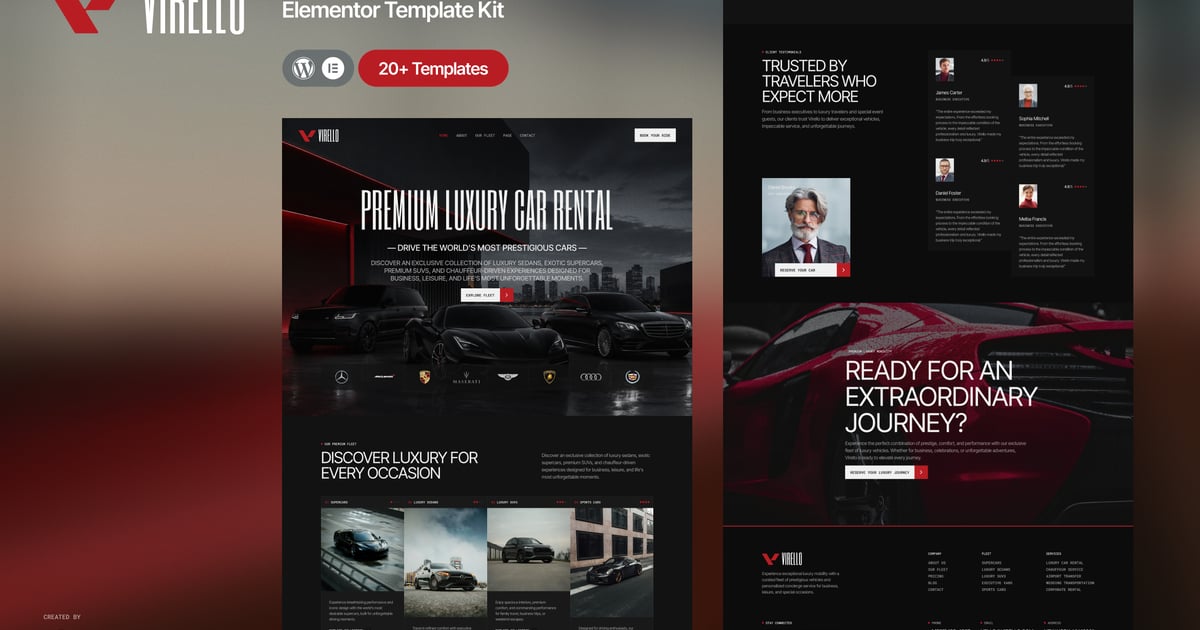
Description
Virello is a premium Elementor Template Kit designed for luxury car rental companies, chauffeur services, executive transportation providers, limousine businesses, and premium mobility brands. Featuring a sophisticated dark aesthetic with a bold, conversion-focused layout, Virello helps you showcase your exclusive vehicle fleet, premium services, rental packages, customer testimonials, and luxury travel experiences through professionally crafted pages that inspire confidence and drive bookings.
Built exclusively for Elementor Free, Virello is fully responsive, easy to customize, and requires no coding knowledge. Whether you’re launching a luxury transportation brand or upgrading your existing website, this template kit provides everything you need to create a refined online presence with a seamless and premium user experience.
Suitable For:
- Luxury Car Rental Companies
- Chauffeur Service Providers
- Executive Transportation Services
- Limousine Rental Businesses
- VIP Airport Transfer Services
- Luxury Vehicle Leasing Companies
- Premium Mobility Brands
- Wedding Car Rental Services
- Corporate Transportation Providers
- Private Luxury Travel Services
Features:
- Using Free Plugins (Elementor Pro is not required)
- Premium Luxury Car Rental Design
- 20+ Ready-to-Use Page Templates
- Dedicated Fleet Collection & Vehicle Detail Pages
- Booking, Pricing & Chauffeur Service Pages Included
- Testimonials, FAQ & Contact Pages Included
- Unlimited Colors
- 900+ Ready Fonts
- Fully Responsive & Mobile Friendly Layout
- Global Theme Style for Easy Customization
- Fully Customizable with Elementor
- No Coding Knowledge Required
- One Click Template Kit Import
Templates Include:
- Global Theme Style
- Home
- About
- Fleet Collection
- Car Details
- Services
- Pricing
- Booking
- Testimonials
- FAQ
- Contact
- Blog
- Single Post
- 404 Page
- MetForm Contact
- MetForm Main Booking
- MetForm CTA Booking
- MetForm Newsletter
- Header
- Footer
Required Plugin:
- Elementor
- Jeg Elementor Kit
- ElementsKit Lite
- MetForm
How to Use Template Kits:
THIS IS NOT a WordPress Theme. Template kits contain the design data for Elementor only and are installed using the Envato Elements plugin for WordPress or directly through Elementor.
Detailed Guide:
https://help.market.envato.com/hc/en-us/articles/36033428836889-How-to-Upload-Install-Elementor-Template-Kits-from-Themeforest-to-WordPress
For further support, go to Elementor > Get Help in WordPress menu.
How to Import Metforms
If you have Elementor Pro, skip install of Metform and form blocks.
- Import the metform block templates
- Import the page template where the form appears and right-click to enable the Navigator
- Locate and select the Metform widget and click Edit Form. Choose New, then Edit Form. The builder will appear
- Click ‘Add Template’ grey folder icon.
- Click ‘My Templates’ tab.
- Choose your imported metform template, then click ‘Insert’ (click No for page settings).
- Once the template is loaded, make any desired customizations and click ‘Update & Close’ The form will appear in the template
- Click Update
Setup Header in ElementsKit Lite Plugin
If you have Elementor Pro, headers and footers may be customized under Theme Builder.
- Go to ElementsKit > Header Footer
- If prompted to go through the wizard, click Next all the way through and then return to step 1 (you are not required to enter your email address or share your information)
- Click Add New Template button at the top
- Name your template, then toggle “Activate/Deactivate:” to On
- Click the gray Edit Content button. Elementor will open.
- Click the gray folder icon to access My Templates tab and Insert the header or footer template.
- Customize and Publish
IMPORTANT:
This Template Kit uses demo images from Envato Elements. You will need to license these images from Envato Elements to use them on your website, or you can substitute them with your own.
https://elements.envato.com/collections/QSGJR9WTKP